> ## Documentation Index
> Fetch the complete documentation index at: https://docs.blinkops.com/llms.txt
> Use this file to discover all available pages before exploring further.
# Authentication
> The different types of authentication available on the Blink Platform
## Standard non-authenticated HTTP requests
You can use HTTP requests without authentication, if the service provider or web server receiving the request does not require authentication.
## Authenticated HTTP requests to existing service providers
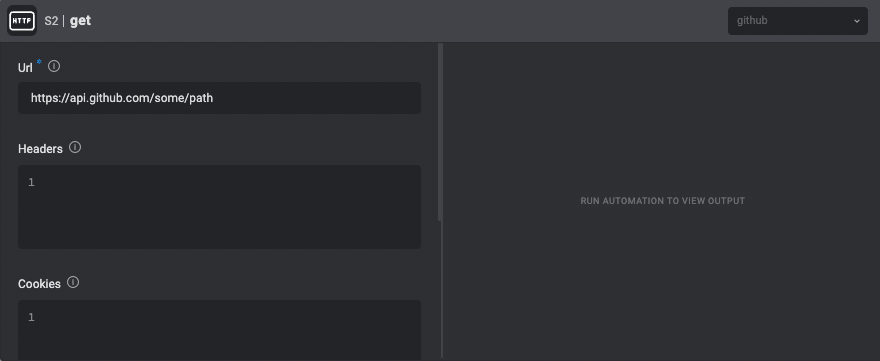
HTTP Actions can be used with most of the Blink connection types to send authenticated requests to existing service providers in Blink.
For example, to send an authenticated request to GitHub's API, use a GitHub connection.
 ## Authenticated HTTP requests to unsupported service providers
Blink adds support for additional service providers on a weekly basis. To use Actions with a service provider that is not currently supported, there are two options:
1. Contact the Blink team to request integration with a new service provider. [Contact us.](https://www.blinkops.com/contact-us/)
2. Use generic HTTP Actions to communicate with unsupported service providers, as explained below.
## Using generic HTTP actions to communicate with unsupported service providers
HTTP Actions can be used with one of the four HTTP connection types to send authenticated requests to service providers that aren't currently supported by Blink:
1. [Basic Authentication](#basic-authentication)
2. [Bearer Authentication](#bearer-authentication)
3. [Custom Authentication](#custom-authentication)
4. [Custom 2 Legged (OAuth 2.0) Authentication](#custom-2-legged-authentication)
### Basic Authentication
Authenticate using the `Basic` authentication standard.
## Authenticated HTTP requests to unsupported service providers
Blink adds support for additional service providers on a weekly basis. To use Actions with a service provider that is not currently supported, there are two options:
1. Contact the Blink team to request integration with a new service provider. [Contact us.](https://www.blinkops.com/contact-us/)
2. Use generic HTTP Actions to communicate with unsupported service providers, as explained below.
## Using generic HTTP actions to communicate with unsupported service providers
HTTP Actions can be used with one of the four HTTP connection types to send authenticated requests to service providers that aren't currently supported by Blink:
1. [Basic Authentication](#basic-authentication)
2. [Bearer Authentication](#bearer-authentication)
3. [Custom Authentication](#custom-authentication)
4. [Custom 2 Legged (OAuth 2.0) Authentication](#custom-2-legged-authentication)
### Basic Authentication
Authenticate using the `Basic` authentication standard.
| Parameter | Description |
| --------------- | ----------------------------------------------------------------------------------------------------------------------------------------------------------------------------------------------------------------------------------------------------------------------- |
| **API Address** | The API Address that you will be able to make http requests to with this connection. Pay attention that http requests to urls that don't match the specified host and path will be blocked in order to prevent someone from sending your credentials to unwanted hosts. |
| **Username** | The username to authenticate with. |
| **Password** | The password to authenticate with. |
### Bearer Authentication
Authenticate using the `Bearer` authentication standard.
| Parameter | Description |
| --------------- | ----------------------------------------------------------------------------------------------------------------------------------------------------------------------------------------------------------------------------------------------------------------------- |
| **API Address** | The API Address that you will be able to make http requests to with this connection. Pay attention that http requests to urls that don't match the specified host and path will be blocked in order to prevent someone from sending your credentials to unwanted hosts. |
| **Token** | The token to use in the bearer header. |
### Custom Authentication
Authenticate using a custom authentication. You can set 3 different header values to be sent in each request.
| Parameter | Description |
| ---------------- | ----------------------------------------------------------------------------------------------------------------------------------------------------------------------------------------------------------------------------------------------------------------------- |
| **API Address** | The API Address that you will be able to make http requests to with this connection. Pay attention that http requests to urls that don't match the specified host and path will be blocked in order to prevent someone from sending your credentials to unwanted hosts. |
| **Header 1/2/3** | The header name. |
| **Value 1/2/3** | The header value. |
### Custom 2 Legged Authentication
Authenticate using a custom 2 legged authentication, also known as `OAuth 2.0`.
After being acquired, the token will be used as a `Bearer` token, in accordance with the `OAuth 2.0` standard.
| Parameter | Description |
| ----------------------------- | ------------------------------------------------------------------------------------------------------------------------------------------------------------------------------------------------------------------------------------------------------------------------------------------------------------------------------------------------------------------------------------------------------------------------------------------------------------------------ |
| **API Address** | The API Address that you will be able to make HTTP requests to with this connection. Pay attention that HTTP requests to URLs that don't match the specified host and path will be blocked in order to prevent someone from sending your credentials to unwanted hosts. |
| **Token Request URL** | The URL of the token request. This URL can be outside the domain of the `API Address` value. |
| **Token Request HTTP Method** | Which HTTP method to use in the token request. Currently we only support `GET` and `POST`. |
| **Token Extraction Path** | The extraction path of the token from the token request response. |
| **Expiry Method** | The method of setting the token expiry. We support the following: The expiry value is extracted from the token request response, The expiry value is extracted from a JWT header (given that the token itself is a JWT) and The expiry value is constant. |
| **Expiry Extraction Path** | `Available in case the Expiry Method is set to Returned in First Leg Response`: The extraction path of the token expiry from the token request response. It is set in the same way as the `Token Extraction Path` is. |
| **Expiry Type** | `Available in case the Expiry Method is set to Returned in First Leg Response`: The type of expiry value that is returned in the token request response. We currently support: The response contains the duration of validity of the token in `seconds`, The response contains the expiration timestamp of the token in Unix timestamp format `1152478800`, The response contains the expiration timestamp of the token in date-time format `2006-07-10T15:04:05Z02:00`. |
| **JWT Header Name** | `Available in case the Expiry Method is set to Extracted from JWT Token`: The JWT header name that contains the expiration date. |
| **Default Expiry** | `Available in case the Expiry Method is set to Constant`: The default expiry of the token in seconds. |
| **Content Type** | The content type of the token request. The request body will be built in accordance with the chosen content type. We currently support `application/json` and `application/x-www-form-urlencoded`. |
| **Body** | Token request body parameters. The body will be built according to the chosen content type. For examples of this, see the examples section. |
| **Headers** | Token request headers. |
| **Disable SSL Enforcement** | Enable this option to skip SSL verification of the server's certificate chain and host name in the token request. This may increase security vulnerabilities but can be useful for testing or when custom verification is employed. |
#### Examples
Since two-legged authentication can be both versatile and complex, please refer to the following detailed explanations of the connection parameters' behavior.
**Token Extraction Path**
The token extraction path parameter is responsible for the correct extraction of the authentication token from the returning response. For example:
The server returns the following payload:
```
{
"token": "myToken",
"expiry": 7999
}
```
The correct `Token Extraction Path` value is `token`.
The server returns the following payload which contains nested fields:
```
{
"2lo_token":
{
"token": "myToken",
"expiry": 7999
}
}
```
The correct `Token Extraction Path` value is `2lo_token.token`.
We currently support extraction only from JSON payload responses.
**Expiry Method and the Accompanying Parameters**
The expiry method parameter is responsible for handling the expiration of the authentication token correctly.
Currently, we support the following types:
* **The expiry value is extracted from the token request response.**
In this case, alongside the authentication token, the response payload contains a token expiration value. The following parameters accompany this expiration type:
* `Expiry Extraction Path` is responsible for the extraction of the expiry value. It has identical logic as the `Token Extraction Path` parameter.
* `Expiry Type` is responsible for the valid evaluation of the expiry value. We currently support: The response contains the duration of validity of the token in seconds, The response contains the expiration timestamp of the token in Unix timestamp format `1152478800` and The response contains the expiration timestamp of the token in date-time format `2006-07-10T15:04:05Z02:00`.
* **The expiry value is extracted from a JWT header, given that the token itself is a JWT.**
In this case, the authentication token is of JWT format and contains in a JWT header the expiration value. The following parameter accompanies this expiration type:
* `JWT Header Name` is responsible for the header name that the expiration time is located in. By default, this value is `exp` but may vary.
* **The expiry value is constant.**
In this case, the authentication token expires after a set amount of time after creation. The following parameter accompanies this expiration type:
* `Default Expiry` is the expiry time in **seconds** in which after the initial request, the token will expire.
**Content Type and Body**
The content type and body parameters are responsible for how the token request payload that is sent in the initial request. For example:
We currently support the following content types:
For each example we will use the `Body` value of `grant_type: client_credentials, client_id: myClientID, client_secret: myClientSecret`
`application/json`
```
{
"grant_type": "client_credentials",
"client_id": "myClientID",
"client_secret": "myClientSecret"
}
```
`application/x-www-form-urlencoded`
```
grant_type=client_credentials&client_id=myClientID&client_secret=myClientSecret
```
**Advanced Parameters**
Under advanced parameters you can find the following parameters:
`Headers` is responsible for the header in the initial token request.
`Disable SSL Enforcement` is responsible for disabling SSL enforcement for the initial token request. **Note** that this doesn't affect the actions that use the connection.
`Zero Trust Parameters` are responsible for all zero trust handling for all action using the connection.