> ## Documentation Index
> Fetch the complete documentation index at: https://docs.blinkops.com/llms.txt
> Use this file to discover all available pages before exploring further.
# About Connections
> Overview of connections in Blink for authenticating workflows with external services and integrations.
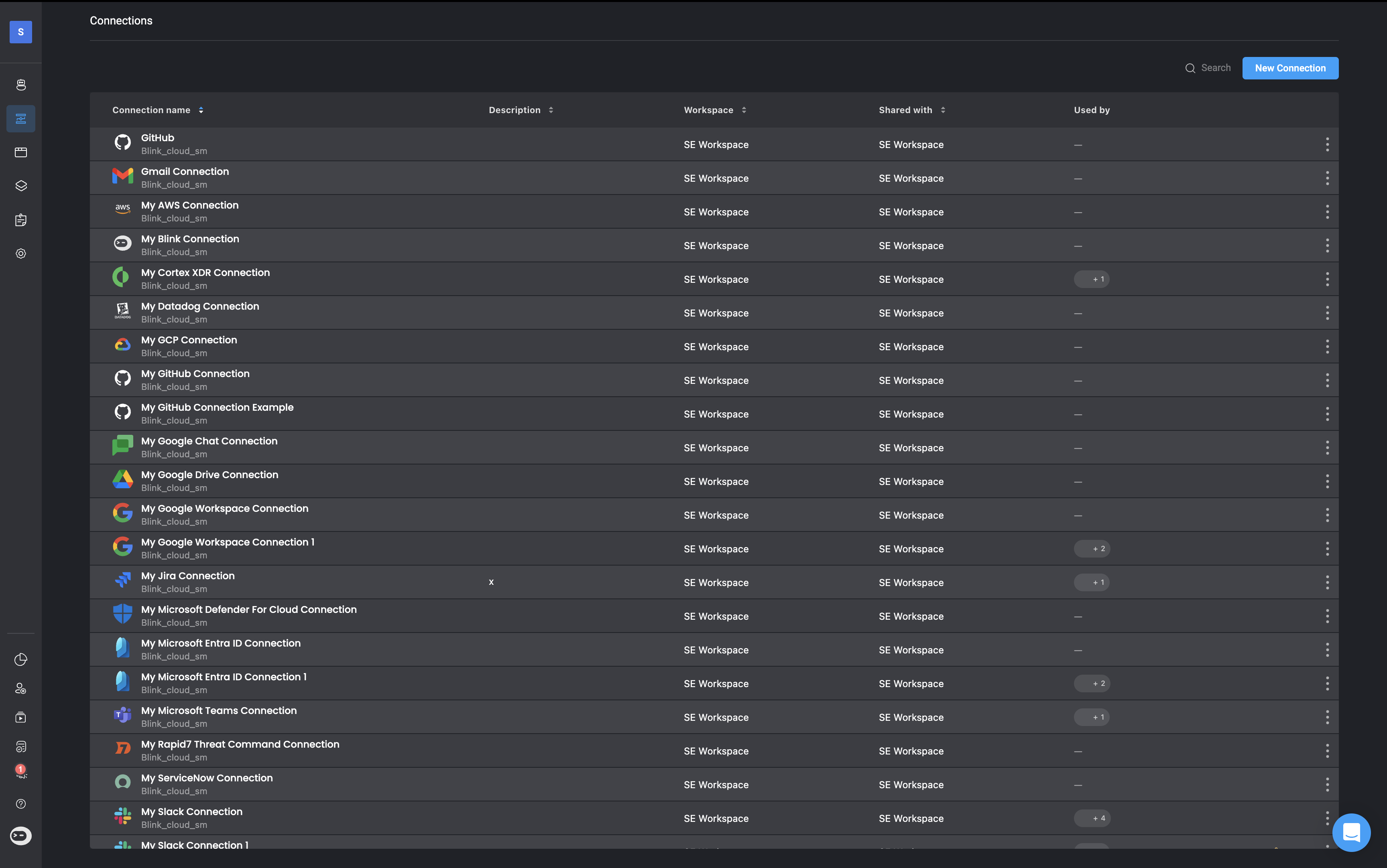
A connection is how a [Workflow](/docs/workflows/workflows) communicates with an external service to perform an action. It provides the necessary authentication and authorization details, either through user credentials or specific authentication parameters required by the target system, so that the workflow can successfully interact with that service.
Connections can be established with a wide range of cloud platforms, security tools, and monitoring systems, including popular services like [AWS](/docs/integrations/aws), [Kubernetes](/docs/integrations/kubernetes), [Slack](/docs/integrations/slack), and [Azure](/docs/integrations/azure). All credentials and configuration data are stored securely using a secret manager.
Once a connection is set up, it can be reused across any future workflows and even shared with other workspaces. This reusability helps streamline workflow creation and ensures a consistent and secure integration process.
 ***
## Connection Types in Blink
Blink supports multiple types of connections to integrate with external services and systems. These connection types allow you to authenticate and interact with APIs, servers, and email services, whether they are cloud-based, on-premises, or custom. Below is an overview of the different connection types supported in the platform:
1. **External Service Providers**: Each third-party service provider (e.g., Slack, Jira, AWS) has its own dedicated connection type. Blink offers out-of-the-box integrations for many popular platforms.
To view the full list and learn how to configure each connection, visit the [Integrations](/docs/integrations/integrations) section of the documentation.
2. **HTTP-Based Connections**: Blink provides three flexible HTTP connection types for authenticating with services not yet supported natively. These types allow you to attach custom authentication headers to your requests:
* **HTTP Basic Authentication**: Use a username and password to authenticate using the Basic Auth scheme.
* **HTTP Bearer Authentication**: Authenticate using a bearer token passed in the Authorization header.
* **HTTP Custom Authentication**: Add up to three custom headers for more advanced or proprietary authentication schemes.
3. **SSH Connections**: Use SSH connections to securely connect to remote servers and run actions over SSH. You will need to provide a private key, username, and optionally a passphrase to encrypt the key.
4. **Email Server (SMTP) Connections**: Use this connection type to send emails through your own SMTP server rather than Blink’s default mail service. This is useful when you need to ensure delivery from a specific domain or enforce internal mail routing policies.
***
## Understanding Your Connections
Each connection includes key details, described in the table below:
***
## Connection Types in Blink
Blink supports multiple types of connections to integrate with external services and systems. These connection types allow you to authenticate and interact with APIs, servers, and email services, whether they are cloud-based, on-premises, or custom. Below is an overview of the different connection types supported in the platform:
1. **External Service Providers**: Each third-party service provider (e.g., Slack, Jira, AWS) has its own dedicated connection type. Blink offers out-of-the-box integrations for many popular platforms.
To view the full list and learn how to configure each connection, visit the [Integrations](/docs/integrations/integrations) section of the documentation.
2. **HTTP-Based Connections**: Blink provides three flexible HTTP connection types for authenticating with services not yet supported natively. These types allow you to attach custom authentication headers to your requests:
* **HTTP Basic Authentication**: Use a username and password to authenticate using the Basic Auth scheme.
* **HTTP Bearer Authentication**: Authenticate using a bearer token passed in the Authorization header.
* **HTTP Custom Authentication**: Add up to three custom headers for more advanced or proprietary authentication schemes.
3. **SSH Connections**: Use SSH connections to securely connect to remote servers and run actions over SSH. You will need to provide a private key, username, and optionally a passphrase to encrypt the key.
4. **Email Server (SMTP) Connections**: Use this connection type to send emails through your own SMTP server rather than Blink’s default mail service. This is useful when you need to ensure delivery from a specific domain or enforce internal mail routing policies.
***
## Understanding Your Connections
Each connection includes key details, described in the table below:
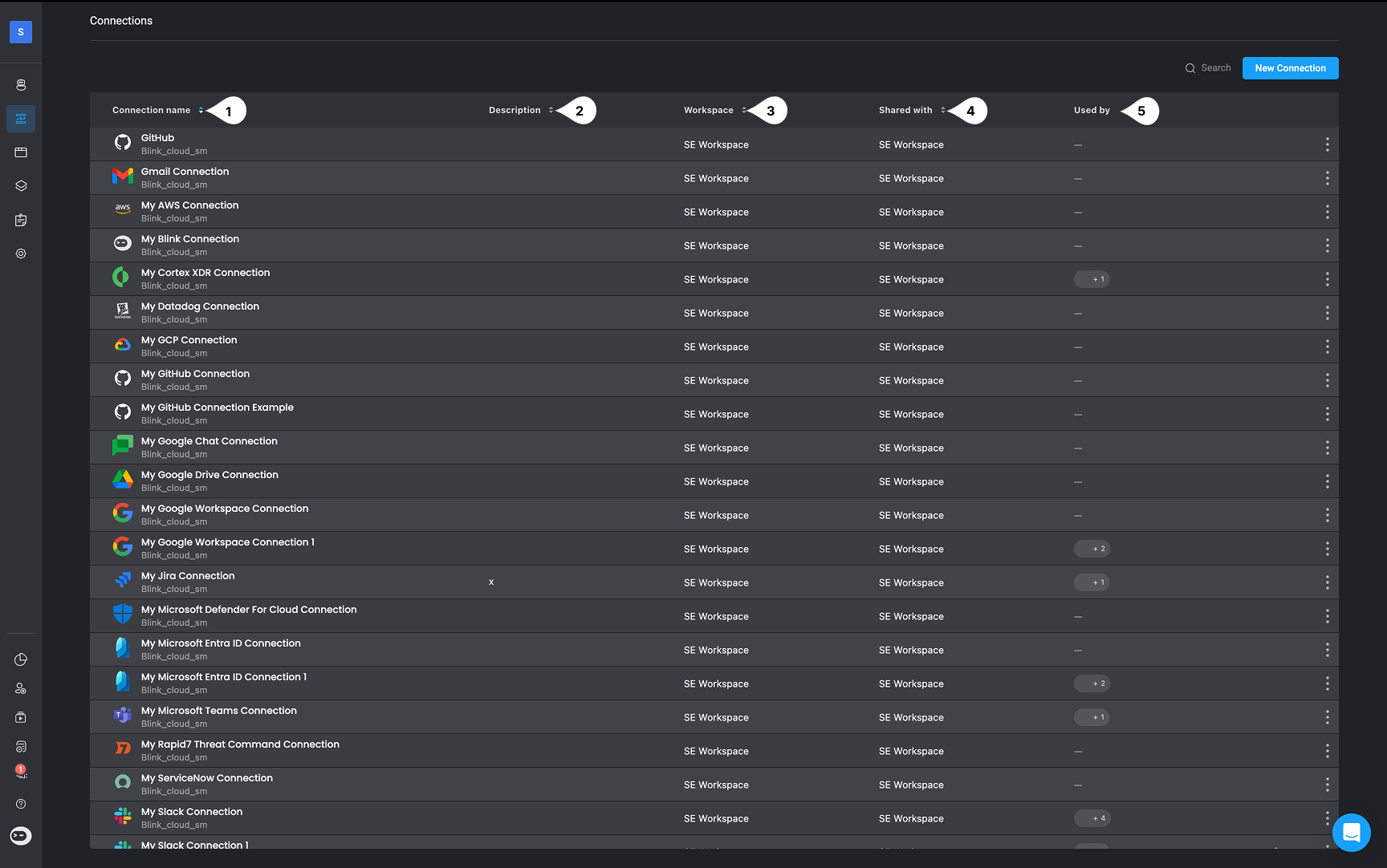
| | Variable | Description |
| - | --------------- | ------------------------------------------------------------------------------------------------------------------------------------------------------------------------- |
| 1 | **Name** | The user-defined name for the connection. |
| 2 | **Description** | **Optional** - A short description of the connection. |
| 3 | **Workspace** | Indicates the workspace where the connection was originally created. If the connection is shared from another workspace, that workspace’s name will be shown. |
| 4 | **Shared With** | The names of the workspaces this connection is shared with. To view those workspaces, click **Edit** > **Sharing & Permissions**. |
| 5 | **Used By** | The number of workflows (from your workspace and shared workspaces) currently using this connection. To view these workflows, click **Edit** > **Sharing & Permissions**. |
***
## Related Articles
Step-by-step guide to setting up new connections in the Blink platform.
Learn how to securely share existing connections across different workspaces.
Understand how to apply existing connections within your workflows.
Learn how to configure connections to on-premises applications.