

The Extract Observables Action
The Extract Observables action plays a foundational role in the alert processing workflow by automatically parsing incoming alert payloads and extracting these critical observables, along with any detectable relationships between them. By turning unstructured alert data into actionable intelligence early in the workflow, this action sets the stage for effective enrichment, correlation, triage, and automated response.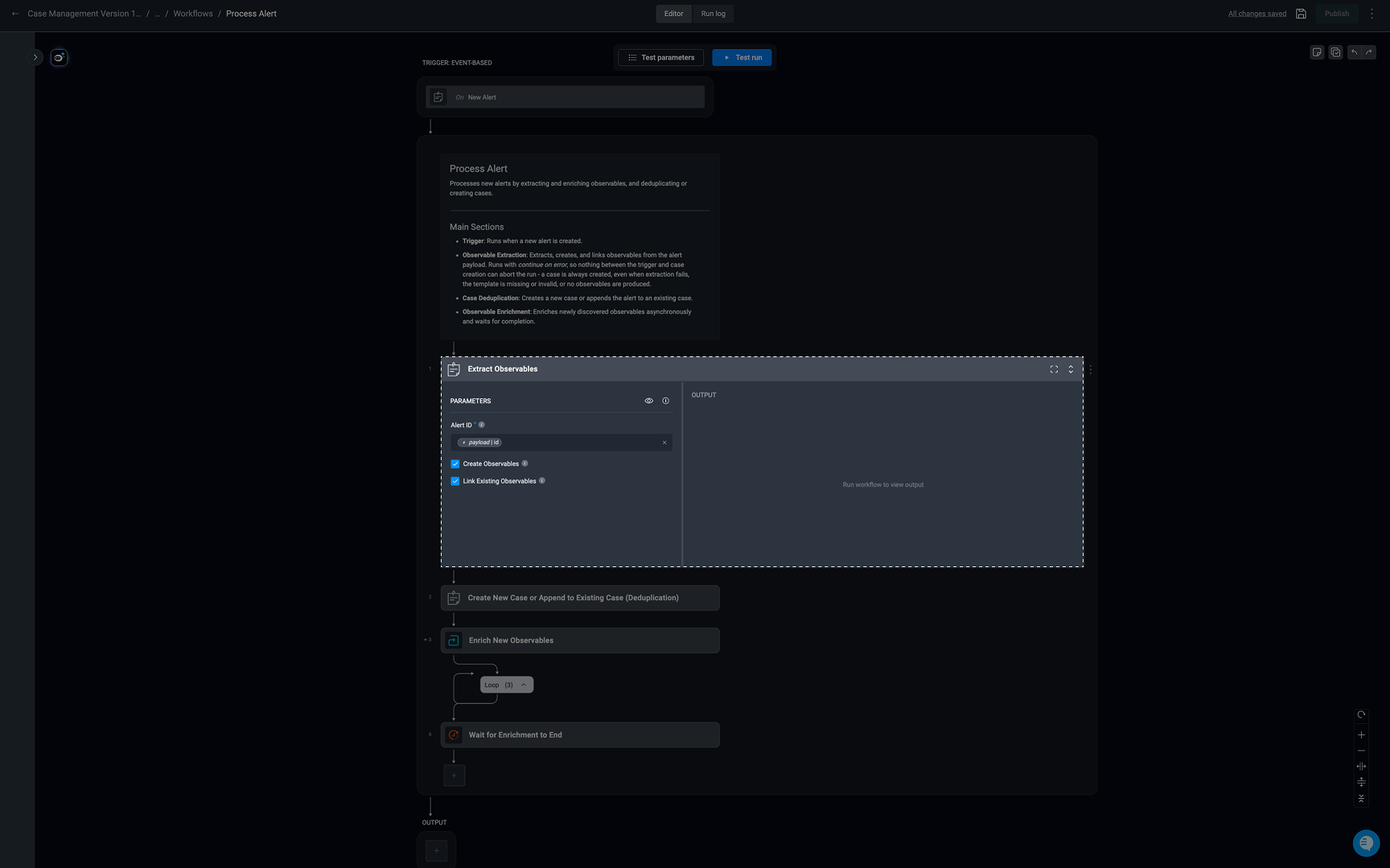
Dynamic Schema Detection for Observable Extraction
Observable extraction supports dynamic schema evaluation to handle evolving alert payload structures without requiring manual extraction rule maintenance. Incoming alert payloads are continuously evaluated for schema changes, including the introduction of previously unseen fields. When a schema change is detected and determined to be relevant to observable extraction, the extraction engine can automatically revisit the associated extraction rule and extend its field mappings during execution. This enables the system to:- Detect newly introduced fields in incoming payload schemas
- Re-evaluate extraction logic against updated payload structures
- Dynamically extend extraction rules when applicable
- Automatically identify and extract newly available observables without requiring manual rule updates
How it Works
-
Alert Processing and Initialization
- When a new alert is added to the Alerts Table, its Alert ID is received, and the system retrieves its associated payload. This payload is then processed to extract key observables and its relations (if they exist) systematically, ensuring all relevant data points are captured for further analysis.
-
Template-Based Parsing
- Using predefined Observable Extraction Rules in Case Management Settings, the system identifies specific alert payload fields that contain observables. Each rule maps payload keys (e.g.,
device.external_ip) to their corresponding observable types (e.g., IP Address), ensuring structured and consistent extraction.
- Using predefined Observable Extraction Rules in Case Management Settings, the system identifies specific alert payload fields that contain observables. Each rule maps payload keys (e.g.,
-
Extraction and Validation
- Once identified, it then verifies whether each extracted observable is valid and unique, preventing duplicates and filtering out irrelevant data.
-
Creating and Linking Observables
- Create Observables: If the Create Observables option is enabled, extracted observables are added to the Observables Table, categorized by type (e.g., IP addresses, usernames).
- Link Existing Observables: If the Link Existing Observables option is enabled, the extracted observables are linked to the alert record, associating them with existing data for further investigation.
Extract Observables Action Fields
Extract Observables Action Fields
‘Extract Observables’ Action Output
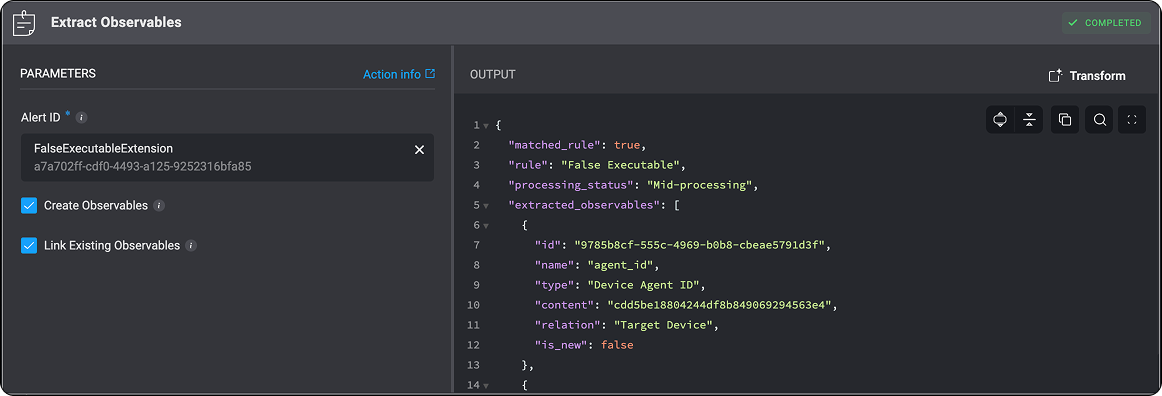
When the ‘Extract Observables’ action is executed, the output is returned in a structured JSON format. This output provides detailed information about the observable extraction process, including the following key fields: Note: The following images and
JSON outputs are provided for illustrative purposes only. The actual results you see may vary depending on how you have configured the Extract Observables action and the associated Extract Observable Rules.Extract Observables Output Example
Extract Observables Output Example
Breakdown of the JSON Key-Value Pairs
Breakdown of the JSON Key-Value Pairs
matched_rule : Indicates whether the alert matched an existing Observable Extraction Rule.rule: The name of the rule that was matched, if applicable.processing_status: Represents the current state of the observable extraction workflow.- Unprocessed – The alert has not yet gone through observable extraction or any related processing.
- Missing Template – No matching Observable Extraction Rule was found for this alert, meaning the system doesn’t know how to extract observables from its structure.
- Mid-processing – The alert is currently being processed. Observable extraction or case deduplication is still in progress.
- Bad Template – A matching Observable Extraction Rule was found, but the system failed to extract any observables because the expected fields (defined in the rule) were not present in the alert’s data. This status is only assigned if
0observables were extracted. - Processed – The alert has successfully completed observable extraction and case deduplication.
In the Extract Observable action, if both the Create Observable and Link Existing Observables checkboxes are left unchecked, the
processing_statusfield will be omitted from the output. As a result, the processing status will not be updated when the action is executed.
extracted_observables: A list of observables that were successfully extracted from the alert. Each observable object contains the following attributes:id: A unique identifier for the observable.name: The logical name of the observable (e.g.,agent_id).type: The classification of the observable (e.g.,Device Agent ID).content: The extracted value or identifier (e.g., a hash, string, or ID).relation: The context in which the observable is associated with the alert (e.g.,Target Device).is_new: A boolean value that indicates whether the observable was newly extracted during alert processing. If set totrue, the observable is considered new and will be included in thenew_observablesarray at the bottom of the JSON output. If set tofalse, the observable already existed in the system and will not appear in thenew_observableslist.
new_observables: [] – This array contains only observables marked with is_new: true. An observable is considered new and included here only if an identical observable (based on its content value) does not already exist in the system. This ensures that duplicate observables are not reprocessed.case_type: The case type defines the classification or category assigned to the case that was generated from the alert. This value is typically determined based on the matched rule.log: Displays the rule selection process during deduplication. It lists additional rules that were considered but not applied because a more suitable rule was chosen for the extracted observable in the case match. This visibility helps users understand how rules are applied and supports easier self-service troubleshooting. If no additional rules are found, the field remains an empty string.The system selects the most appropriate rule based on the Alert Name. When multiple rules could match, the rule with the longest matching string is prioritized, and exact matches take precedence over regular expression (regex) patterns.
Troubleshooting Observable Extraction Action
When the observable extraction action fails or produces unexpected results, first check how Blink processes and maps observables from the alert payload based on the configured deduplication rules (templates). The following scenarios can help identify the cause of an extraction issue:- Missing Template: No matching extraction template could be found for the alert.
- Invalid Template: A matching template was found, but it did not extract any observables. This typically indicates an issue with the template logic or mapping.
- Partial Extraction: Only some of the expected observables were extracted, even though the template mapping includes additional observables. This may be caused by the structure of the alert data or how the extraction rules are defined.
- Duplicate Observable Content (edge case): An observable’s content may already exist in another observable. In this case, the observable linked to the alert retains the original observable type associated with that content.
-
Extraction Limit (edge case): If an alert contains more than
100 observables, none of them are extracted. This is a built-in limit on the number of observables that can be extracted from a single alert.